Zum Inhalt springen
Enterprise Accessories for Mobile Devices
|
Bulk Pricing (10+ Units)
|
Fast U.S. Fulfillment
|
Business & Government Orders

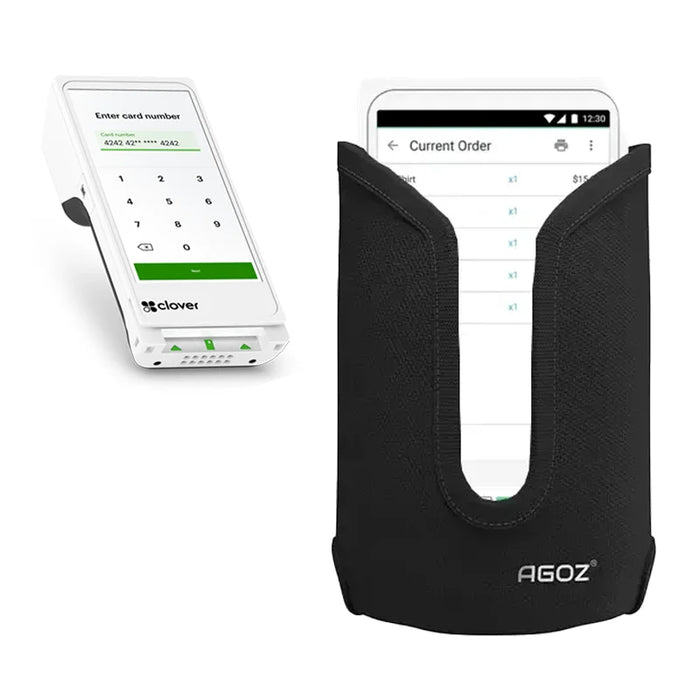
Clover Flex Handheld POS-Terminal Holster mit Gürtelclip | Agoz

Quick-Access Belt Carrying for Clover Flex Teams Processing Payments Away From Fixed Checkout Stations
Model # VU03
Originalpreis €18,95 - Originalpreis €28,95
Originalpreis
€18,95
€18,95 - €28,95
Aktueller Preis €18,95
Save more with bulk pricing for team orders

REQUEST BULK PRICING (10+ UNITS)
Customization Without Limits
From custom brand logos to unique dimensions, we modify and tailor accessories to match your field hardware requirements.
One Source, Every Accessory
Consolidate your supply chain. We design, manufacture, and supply holsters, mounts, chargers, and screen protection under one roof.
Built to Scale Fast
Accelerated production lines and robust bulk manufacturing designed to fulfill large-scale corporate rollouts on time.
U.S.-Based Inventory, Zero Guesswork
Housed in our secure US facilities, expect real-time stock levels, rapid local dispatch, and fully transparent tracking.
Low MOQs, High Flexibility
Flexible minimum order limits designed to let you pilot deployments with low risk.

Turn Clover Flex Into Truly Employee-Worn Payment Hardware

Fast Access. Secure Belt Carry. Hands-Free Mobility.

Clover Flex handheld gives employees the ability to take payments away from a traditional register, but that mobility creates another question: where does the terminal go between transactions? The Clover Flex POS Holster with Metal Belt Clip and Loop gives the handheld terminal a defined position directly on the employee.

  • Keep Clover Flex Ready for the Next Customer The drop-in holster allows employees to retrieve the terminal when needed and return it to the same carrying position after each transaction.
  • Free Both Hands Between Payments Employees can perform service, merchandising, order handling, and other duties without continuously carrying the terminal.
  • Choose the Appropriate Belt Attachment The metal clip provides convenient attachment and removal, while the belt loop supports a more fixed connection to an employee's work belt.

Other Clover POS accessories can complement the holster where businesses also need countertop positioning, transport, or other equipment configurations.

AgozTech develops Clover Flex handheld carrying systems around the terminal's core advantage—mobility—helping businesses extend handheld payment capability beyond the register without leaving employees to improvise where the device is carried between transactions.

Device-Specific Use Cases

  • Restaurant Tableside Payments Servers can carry Clover Flex throughout their section and retrieve the terminal when guests are ready to pay.
  • Retail Line Busting & Floor Checkout Associates can bring checkout directly to customers during busy periods while keeping the terminal available between transactions.
  • Hospitality & Guest Services Employees moving throughout a property can maintain access to payment hardware without repeatedly returning to a fixed POS station.
  • Compatible Clover Handheld Models Clover Compact (C801), Clover Flex 2 (C403), Clover Flex 3 (C405), Clover Flex 4 (C406), Clover Go

Fit and Function for Clover Flex Terminal Holster

  • Quick Drop-In Access The open carrying format supports frequent terminal removal and return during transaction-heavy workflows.
  • Metal Belt Clip The clip provides a convenient way to attach the holster at the waist and reposition it when necessary.
  • Integrated Belt Loop The loop provides a second attachment method when employees need the holster threaded directly onto their belt.

Enterprise Buyers — Save Time & Money

Clover Flex deployments are often intended to make checkout more mobile. Standardizing the holster helps ensure that mobility does not create inconsistent device handling from one employee or location to another.

Businesses can issue the terminal and carrying solution together, creating a repeatable setup for employees who process payments throughout the work environment.

  • Standardize Clover Flex employee carry
  • Bulk pricing for business deployments
  • Support mobile checkout workflows
  • Reduce loose terminal placement
  • Keep payment hardware with assigned users
  • Simplify accessory replacement
  • Fast U.S. fulfillment
  • Responsive procurement support

AgozTech helps enterprise buyers turn Clover Flex mobility into a repeatable operational standard, giving employees a consistent carrying position while procurement gains a scalable method for issuing, replacing, and managing terminal accessories.

Features

  • Rugged POS holster
  • Quick drop-in access
  • Multiple configurations
  • Metal belt clip
  • Hands-free terminal carry
  • Mobile checkout support
  • Integrated belt loop
  • Employee-worn design
  • Daily commercial use

FAQ

Which Clover Flex terminal models are compatible with this holster?

The listing supports multiple Clover configurations. Clover Compact (C801), Clover Flex 2 (C403), Clover Flex 3 (C405), Clover Flex 4 (C406), Clover Go

Is bulk pricing available for Clover Flex holsters?

Yes. Contact us for volume pricing on employee, departmental, or multi-location deployments.

Can employees quickly remove Clover Flex for payment?

Yes. The drop-in format is intended for repeated terminal access throughout the workday.

Does the holster include a belt clip and belt loop?

Yes. Both attachment methods are incorporated into the carrying design.

Das könnte Ihnen auch gefallen

AGOZ
Auf Lager

Über die Clover Flex POS Wandhalterung – Schwenk- und Neigungsverstellbar Die verstellbare Metall-Wandhalterung mit Schwenkfunktion für Clover POS...

Vollständige Details anzeigen
€54,95 | View Product
AGOZ
Auf Lager

Clover Flex über die Kasse - und über den Gürtel hinaus tragen Crossbody-Mobilität. Anpassbares Tragen. Geschützte POS-Aufbewahrung. Das Tragen ...

Vollständige Details anzeigen
€14,95 | View Product
Produkte vergleichen

{"one"=>"Wählen Sie 2 oder 3 Artikel zum Vergleichen aus", "other"=>"{{ count }} von 3 Elementen ausgewählt"}

Wählen Sie das erste Element zum Vergleichen aus

Wählen Sie den zweiten Artikel zum Vergleichen aus

Wählen Sie den dritten Artikel zum Vergleichen aus

Vergleichen